YouTube embeds and VSL conversions: what's breaking and how to fix it





Picture the moment your VSL hits the offer: the viewer is leaning in, hand near the trackpad. The video ends, and YouTube fills the player with three thumbnails: a competitor’s product demo, something the algorithm picked at random, and a lo-fi mix that has nothing to do with anything you sell.
Most teams embed from YouTube because it’s free and takes seconds. The tradeoffs stay invisible until you look for them: the embed loads its own scripts before your content, shows recommendations when the video ends, tells you nothing about who actually reached your offer, and pulls viewers back into YouTube’s feed. We put the two platforms side by side here, feature by feature. That’s the player working as designed: discovery and watch time on YouTube, just not on your landing page.
VSLs are where that cost shows up most clearly, because the entire conversion path runs through one video. Even if there’s supporting content below the fold (testimonials, an FAQ block, a guarantee, payment options), the video carries the pitch. If the player adds friction before or after the video plays, there’s rarely a second chance to deliver the same message.
We’ll go through what YouTube embeds actually do to your conversion path, give you a quick audit you can run on your own page today, and line up six hosting alternatives, so that you can decide whether “free” is actually costing you money.
Before we dive in
Everything in this article applies to any video where the goal is conversion: product demos on pricing pages, course promos, onboarding walkthroughs, webinar replays. If the video sits on a page you pay to send traffic to, the hosting platform is part of the conversion path.
How YouTube embeds work against your VSL
There are four specific ways a YouTube embed interferes with conversions on your page.
Recommendations don’t stop when your video ends
When a YouTube embed finishes playing, the player fills with suggested videos. Some of these will be from competing brands; others will be tangentially related content that pulls viewers deeper into YouTube’s ecosystem. You can add `?rel=0` to the embed URL, but since 2018 this parameter only hides videos from other channels; YouTube’s own algorithmic suggestions and your channel’s uploads still appear.
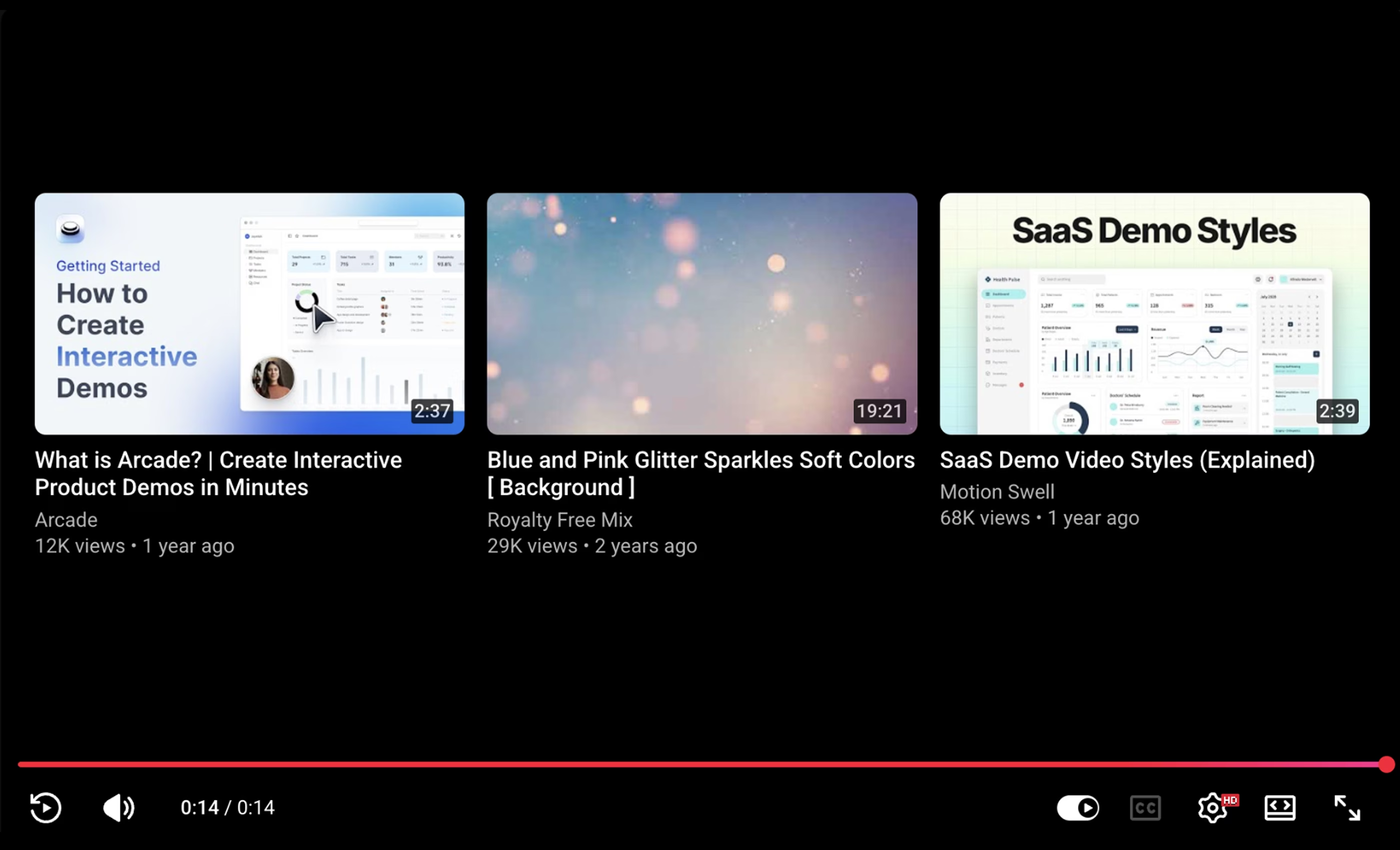
Think about the timing: your viewer just watched your entire pitch and is considering the offer. And then the player is showing them a thumbnail for “Top 5 Alternatives to [Your Product]” or a compilation video that has nothing to do with what you’re selling. Some percentage of viewers will click. That’s paid traffic leaving through a door YouTube opened.
Videos load slower than you’d expect
Embedding from YouTube means the page loads YouTube’s whole stack before your video file: iframe JavaScript, the player framework, tracking scripts, thumbnail assets served from Google’s CDN. Paul Irish at Google’s Chrome team built the “Lite YouTube Embed” script for this reason. He measured the standard embed at 1.3 MB and dozens of network requests on first load, with around 5 seconds of overhead before play.
A direct CDN player skips that scaffolding. On our own desktop test over a 100 Mbit/s connection, a Kinescope-hosted VSL fired its load event in just over 500 ms.
YouTube embed
~5s
The player loads YouTube’s framework, tracking, and ads before your video starts buffering.
Direct CDN player
0.5s
Video file served directly to the browser. No platform scaffolding in front of it.
Why does this matter? Portent’s analysis (27,000 landing pages, 100 million+ page views) found that sites loading in 1 second have a conversion rate 3x higher than sites loading in 5 seconds. Deloitte’s “Milliseconds Make Millions” study (30 million sessions, 37 brands) measured even steeper drops: up to 8% in retail and 10% in travel per 0.1 seconds of improvement. On a VSL page, where the entire conversion path is “watch video → click buy,” that overhead compounds before your pitch even starts.
YouTube Analytics doesn’t connect to revenue
YouTube Analytics shows you view counts, average watch duration, drop-off curves, and traffic-source breakdowns. None of it is per-viewer — so the question of who actually reached your offer or converted lives somewhere outside YouTube. Without that, optimization becomes guesswork. If conversions are low, you don’t know whether to shorten the video, move the CTA, adjust the script, or change your targeting. The available data doesn’t connect to revenue, which makes it hard to know what to change.
VSL · Landing page
Engagement
Engagement curve for a 12-minute sales-outreach VSL. Kinescope analytics dashboard example
This also limits how you retarget. Someone who watched 80% of your VSL and left before buying is in a completely different place than someone who bounced after 10 seconds. The first person heard your pitch and needs a reason to come back, while the second one needs a different hook entirely. YouTube doesn’t distinguish between them; both are just “views” in your retargeting audience.
Platform branding and ads compete with your pitch
Unless your viewer pays for YouTube Premium, they may see a pre-roll ad before your VSL starts, and longer videos can trigger mid-roll interruptions at moments YouTube’s algorithm picks. The logo, progress bar, and suggested content sit on top of your video throughout. For a format that works by controlling attention and removing distractions, that’s a lot of noise you didn’t put there.
When YouTube still makes sense
YouTube is great for discovery — educational videos, brand content, Shorts. A VSL is a different job: it sits on a landing page you control, takes traffic you pay for, and needs to convert. The hosting platform is part of that path, so it’s worth choosing one built for the same goal.
What changes when you move off YouTube
We build a video hosting platform, so we see this transition often. Many of our clients started with YouTube embeds and switched to a dedicated player once load times, recommendations, or the analytics gap became a bottleneck.
Here’s what changes on the landing page after the switch:
- The video starts before attention fades. 61% of mobile users abandon pages that take longer than 2.5 seconds to load. A direct CDN player can be ready in under half a second, compared to the 2+ seconds a YouTube embed needs just to initialize its iframe and scripts.
- You control what happens afterwards. The player stays clean when the video ends. That means no recommended videos pulling viewers away and no platform branding competing with your page. The viewer sees your call to action or a blank frame, and that’s it.
- You actually see what’s happening. Detailed analytics show exactly how far each viewer got: who reached the offer, who dropped off at the intro, who rewatched your pricing section. You can export that data via API, cross-reference it with your ad spend, or run it through an AI tool to spot patterns — for example, which traffic sources produce viewers who actually watch past the pitch.
- The CTA shows up inside the player when the video ends. Right when the viewer has heard the full pitch, rather than as a link below the fold they’d have to scroll to find.
- Mobile autoplay actually works. Safari browser has strict autoplay rules that can silently break your funnel. A conversion player handles muted autoplay with a clear unmute prompt, so the video starts instead of sitting behind a play button.
How to check your setup
Before comparing platforms, it’s worth running a few checks on your own landing page. These will tell you whether the embed is a bottleneck.
- Measure load time. Open the landing page in Chrome → DevTools → Network, set throttling to “Slow 4G” (this simulates the connection most visitors actually have), and hard-reload. Note how long it takes until the player is ready: two seconds or more means some visitors leave before the video even appears.
- Watch the video to the last frame. Let it play to the end and look at what the player shows afterward. If you see a grid of YouTube recommendations, so does every viewer who sits through your pitch. This happens on desktop and mobile alike.
- Check the retention curve. In YouTube Studio → Analytics → Audience retention, compare where the curve dips against the timestamp of your offer. A steep drop before the CTA can point to buffering, a pre-roll ad, or the video losing momentum at that point.
If two or three of these checks flag something, the issue is the hosting environment around your VSL.
What are the alternatives?
There are several platforms built for this use case, including a growing number of European ones. Each makes different tradeoffs between price, analytics, and features. We also included our product Kinescope and tried to be fair about where it falls short.
| YouTube | KinescopeSuper | VimeoStandard | WistiaBusiness | DailymotionAdvanced | MavePlus | |
|---|---|---|---|---|---|---|
| No ads or recommendations | ✗rel=0 hides other channels only | ✓ | ✓ | ✓ | ✓ | ✓ |
| In-player CTA | ✓end cards; competes with recs | ✓end-of-video | ✓end cards + custom CTAs | ✓timed overlays | ✗ | ✗ |
| Detailed analytics | ✗aggregate via YT Studio | ✓per-viewer, API export | ✓engagement only; no per-viewer | ✓per-viewer heatmaps | ✓custom reports + API | ✗cookieless view counts |
| Customizable player | ✗YouTube logo always visible | ✓white-label | ✓logo + colors; Vimeo badge stays | ✓white-label | ✓white-label on Advanced | ✗theming from Pro (€179) |
| Domain restriction | ✗ | ✓ | ✓ | ✓ | ✓ | ✓ |
| EU data hosting | ✗US-based | ✓Netherlands | ✓optional; US by default | ✗US only | ✓France | ✓Netherlands |
| Starting price | Free | from €10/mopay-as-you-go | €19/mo | ~€86/mo | €84/mo | €19/mo |
Prices accurate as of April 2026.
Making the switch
Switching doesn’t have to be an all-or-nothing move. You can start with one page, measure the difference, and scale from there.
Test with one page
Pick the landing page with the highest ad spend or the worst conversion rate. Duplicate it, replace the YouTube embed with a dedicated player on the copy, and run an A/B test through your ad platform or landing page builder. A few hundred visits per variant is usually enough to see whether conversion rates change.
Migrate the rest
If the dedicated player version converts better, move the rest of your videos. The process is the same for each file, and some platforms (Wistia or, full disclosure, us) will migrate your entire catalog for you, so you skip the manual part altogether.
Put the data to work
Once your videos are on a platform with detailed per-viewer analytics, you have data YouTube never gave you: where viewers drop off, which traffic sources produce people who actually watch past the CTA, and whether your script loses momentum at the same point across campaigns. Connect the catalog to an AI tool and monitor patterns continuously, rather than checking dashboards manually after each launch.
Wrapping up
YouTube embeds don’t underperform because of the video, but rather because the platform keeps doing its job: recommending content, loading its own interface, keeping viewers inside YouTube. Your landing page needs the opposite, and the player is the part of the conversion path that’s easiest to fix.
You can try Kinescope with your own video: upload one file, embed it on your page, and compare load time, retention, and conversions against your current setup. If you decide to move, we’ll transfer your entire catalog from YouTube at no extra cost.