Secure video streaming: what each layer stops




Host video with DRM and access rules
You have something worth protecting — a paid course, a board recording, a cut of a film that has not premiered. Every vendor selling secure video streaming uses the word for something different: an encrypted connection at one, a password on the page at the next, DRM on the file at a third.
Those three defend against different people. A password keeps out whoever wandered into a link, and does nothing to a downloader aimed at the media address. DRM works the other way round, on the file itself, and once a copy is out in the world the question of which account produced it belongs to yet another control.
So the useful order runs backwards from the shopping list — name the person you are defending against, then buy the lightest layer that beats them. This guide takes the five things secure video streaming is sold as, says what each stops, and shows where the market puts the price.
Key takeaways
- Secure video streaming is sold as five different things, and DRM is the layer that stops an authorised viewer from saving a playable file with common download tools.
- A password guards playback while the media keeps its own address, so test any access layer against a direct request for the file.
- Widevine and FairPlay are licensed together because neither covers a full audience alone.
- If a copy is already out, only a per-viewer watermark tells you whose account it came from.
- Protection is priced per layer: Dacast keeps DRM for video on demand on its Scale tier (≈€142/mo, against ≈€34 for Starter), SproutVideo’s security page names no DRM at all, and Kinescope includes it on Super, off until you enable it.
Choosing a secure video platform starts with a threat model
Every control on a secure video platform costs something, so start with the one that answers the person you are defending against.
| Who you are defending against | The lightest layer that beats it |
|---|---|
| A viewer who forwards the course link into a group chat | Unique access codes with an expiry and one active session, or playback authorisation your backend answers per view |
| A paying viewer who points a downloader at the player | DRM, so the saved copy will not play |
| An organised leak resold in a private channel after launch | A per-viewer watermark to name the account it came from, with DRM to raise the cost of making the copy |
Of the four vendors checked here (Dacast, SproutVideo, Vimeo and Loom), each prices the layers separately, while Kinescope includes them on one plan. A wrong match costs either money for a control nobody was going to test, or a leak under a plan that still says secure.
The size of the problem is argued in both directions. Parks Associates forecast cumulative piracy losses of USD 113 billion for US streaming providers by the end of 2027 (Parks Associates, April 2023), while the CCIA Research Center’s chief economist has formally challenged the 2019 industry report behind the most widely quoted US piracy-loss figures as overstating piracy’s effect on sales (CCIA Research Center, March 2025). Read any headline loss number as an argument.
Neither figure changes the mechanism you buy. For the organised threat, the monitoring and takedown work covered in what anti-piracy covers and anti-piracy software for video is a different product class, and Kinescope runs no torrent monitoring and no takedowns; what this article covers is the layer that raises the cost of producing the copy and names the account it came from.
“Secure video streaming” means five different things, and the market prices each one differently
Five technologies answer to one adjective, and the tiers they arrive on differ by vendor. Every secure video hosting platform sells some subset, and the five meanings of secure video streaming sort like this.
| What “secure” means | What it stops | What it leaves open | Where the market puts the price |
|---|---|---|---|
| An encrypted connection (HTTPS) | Someone reading the stream in transit | Anything a legitimate viewer does next, from saving to resharing | Included on every plan the vendors below publish, and required on the embedding site for DRM |
| A password on the page | A stranger without the password | The file, which any downloader can still reach | A paid plan at Vimeo; Business and above at Loom |
| Playback authorisation with a domain lock | Embedding on domains you did not approve, and any playback your backend declines | A private link, which bypasses domain rules by design | Domain rules on every SproutVideo plan, signed embed codes and dynamic watermarks from Tree, IP and geographic restrictions on Forest |
| DRM on the file (encrypted video hosting) | Download tools and browser plugins by name, plus screenshots and screen recording on iOS, Android and browsers for macOS and Windows | The audio track, which FairPlay’s own documentation excludes from protection, and a camera pointed at the screen | Dacast’s Scale plan, ≈€142 a month, against ≈€34 for its entry plan |
| An audit report (SOC 2, ISO 27001) | Weak controls inside the provider — who can reach the systems, how changes get approved, whether anyone is watching | Whether one video can be downloaded from your page | Published on the provider’s trust page, the same for every plan |
Prices as of August 2026, approximate — verify on each vendor’s page before committing. Dollar prices are converted at the ECB reference rate for 19 August 2026 (USD 1 ≈ €0.86); every vendor page cited was opened the same day.
The encryption itself is a published ISO standard that the W3C registers as the format browsers accept (W3C), so a vendor advertising encrypted video hosting is describing a file format the industry shares. Browsers only supply the plumbing that hands a licence to the player, so the protection comes from the licence.
The licensing on top carries the price, in a market projected from USD 6.72 billion in 2025 to USD 11.05 billion by 2030 (MarketsandMarkets, July 2025).
The audit row answers a different question. The AICPA’s trust services criteria evaluate a service organisation’s controls over the security, availability, confidentiality or privacy of its systems (AICPA & CIMA), which describes how the provider runs the platform. Whether a student can rip a lesson falls outside that scope.
The prices are public, and no two vendors arrange them the same way. Dacast’s own pricing page, checked 19 August 2026, gives domain and country rules to all four plans and keeps DRM for video on demand on the Scale tier at ≈€142 a month — roughly four times the ≈€34 entry plan.
At SproutVideo the layers ladder up the price list — the security page shows signed embed codes with timed expiration and dynamic watermarks from the Tree plan, domain rules on every plan, IP restrictions, SSO and geographic rules on Forest. It names no DRM anywhere.
Vimeo’s help centre requires a paid plan for the password itself and describes it as a prompt on the player, and Loom’s own documentation keeps it for Business and above. The weakest layer here is itself something you pay for.
Password protected video hosting: the password guards playback, the file has its own address
A password filters out whoever reached the video by accident, which is the whole job password protected video hosting does — and it filters playback, because the player is one address and the media another.
Vimeo shows the shape of it. Its help centre describes a prompt at the player, and its privacy feature pages name passwords, domain-level embed restrictions and download-protection settings, but do not name DRM, Widevine, FairPlay or watermarking — the DRM Vimeo does sell is a tier away, an add-on to the Enterprise plan.
In Kinescope those jobs are three separate rules. Setting embedding to “Nowhere” stops the player loading on other sites, and it leaves a private link or a password working — where the player may load and who may watch never share a switch. Those two rules, plus keeping the video out of public search, are what private video hosting is.
The file has a third rule: DRM blocks common download tools, and a screenshot or a screen recording comes out empty on iOS, Android and browsers for macOS and Windows. Audio capture (which Apple documents as outside FairPlay’s protection) and a camera pointed at the screen stay outside what DRM can stop.
Access control in Kinescope is a different list of five (everyone, a private link, a password, unique codes, or an allowed work email domain), and the password is the middle one.
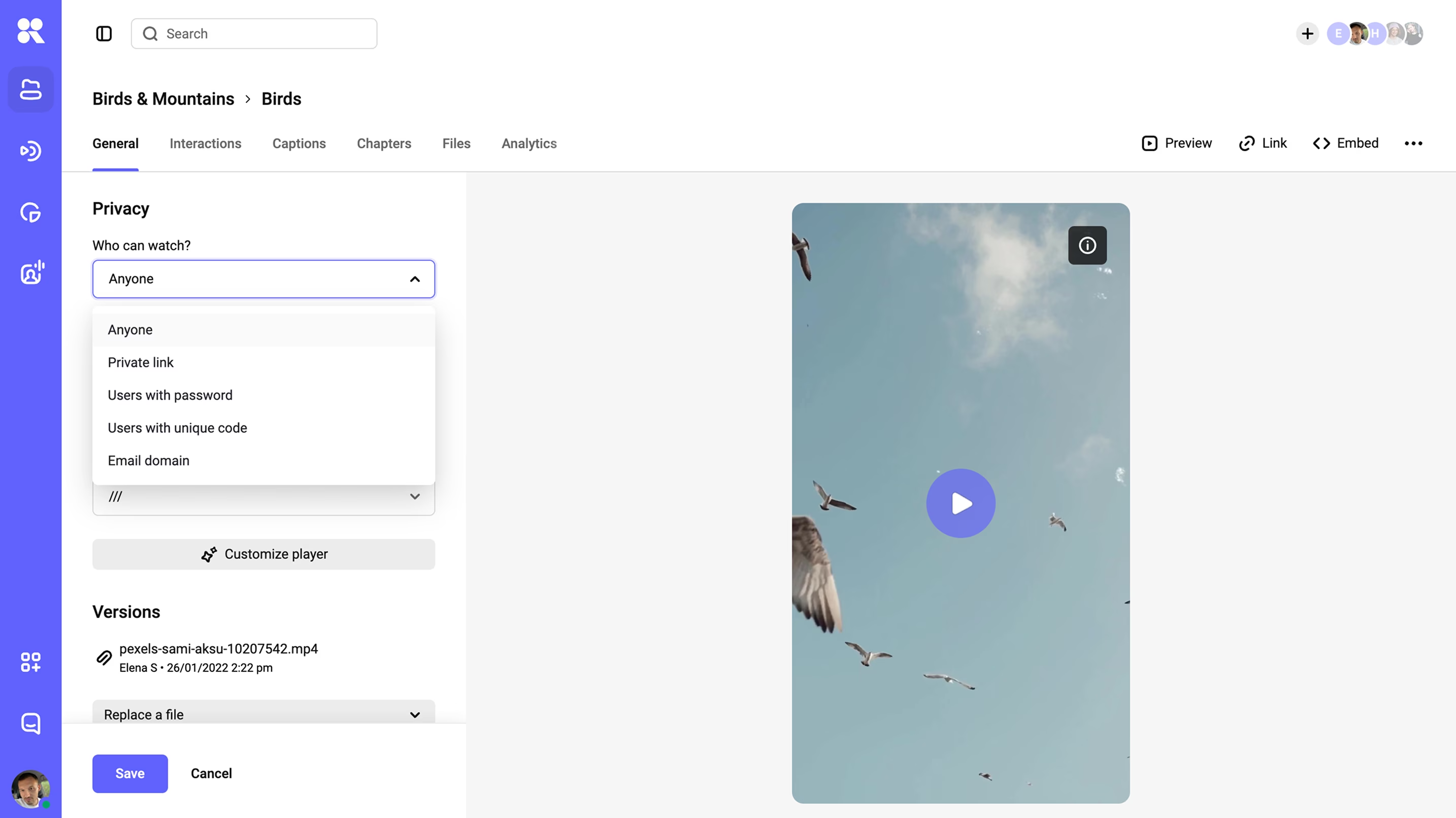
What expires and what a forwarded link hits next: playback tokens, access codes and a domain lock
The control people ask for by name is the signed URL, a playback link carrying an expiry and a token in the address itself, which is how our glossary defines it. We do that job in three places, and the difference shows the moment a link travels.
Playback authorisation: your backend answers every play
Playback authorisation is delegated to your own backend. We call it on each playback; your code checks the rules that matter (course, subscription, role) and answers yes or no, and the decryption key follows only on a yes.
The viewer identifier travels to the player as the drmauthtoken embed parameter, and for production the developer docs recommend a signed JWT as that token: a short string your backend issues, carrying an expiry it verifies, where a bare user ID would be trivial to guess. A token bound to the viewer, session or entitlement lets your backend refuse a copied embed at the next playback, while an expiry check alone only shortens the window for reuse.
Access codes: one code, one session
Unique access codes are the version with no backend involved. A code carries an expiry date, after which it stops working, and one code means one session by default, so a shared code displaces the person who had it: “Session ended — this access code has already been used. Re-entering the code will end the other session.”
Domain lock: where the player may load
Name your trusted domains in the embedding policy and the player loads on those and stops elsewhere, wildcards for subdomains included. The private link is the deliberate exception: it bypasses the configured domain restrictions.
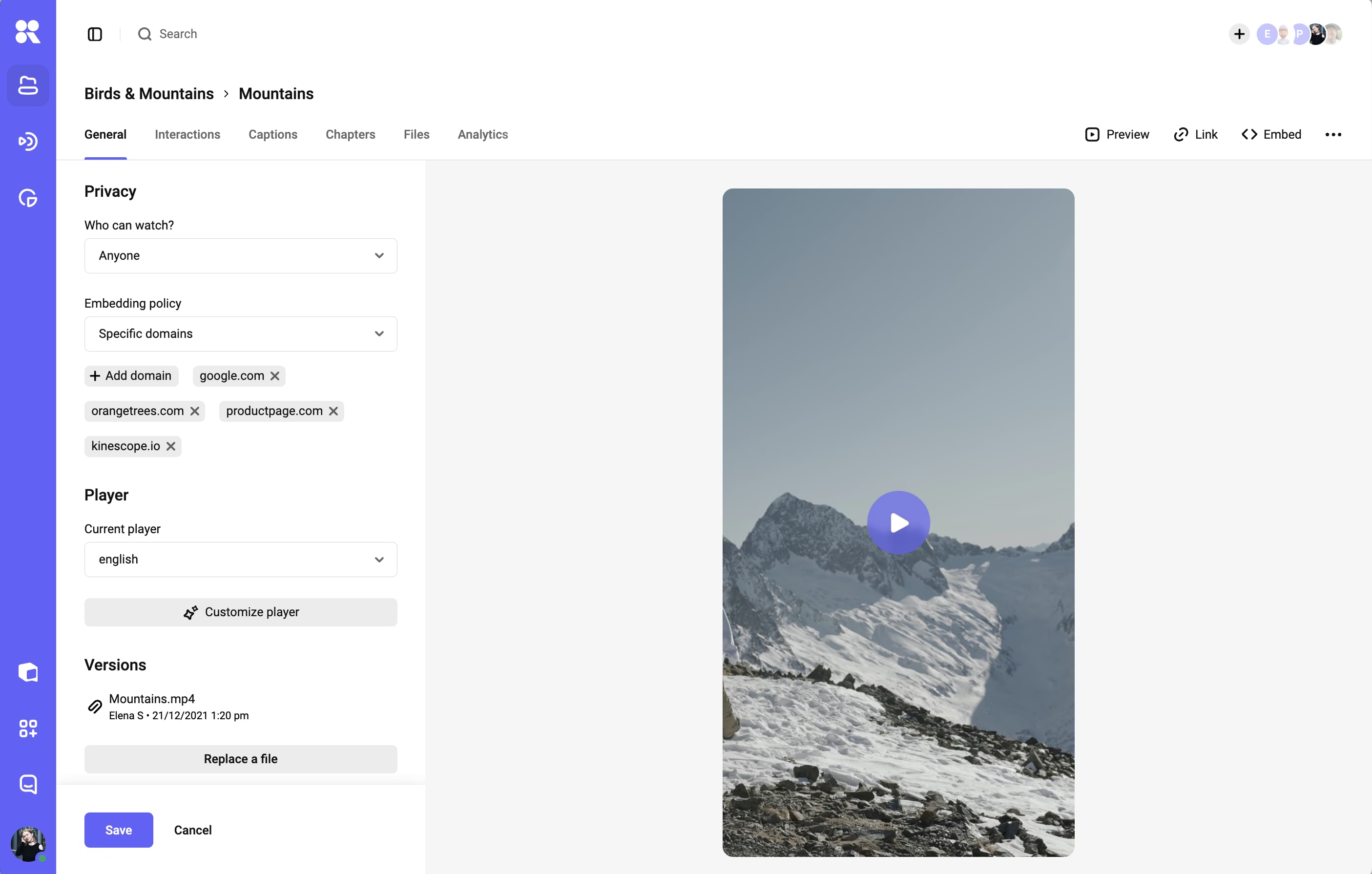
The authorisation call receives the viewer’s IP address and browser, so rules about where and when someone watches run through it as well.
Vendors handle this two ways. SproutVideo and Dacast expose IP and country rules as dashboard switches, fixed at whatever the plan allows. One backend call covers the same ground and keeps going — IP, geography, device and time window judged together, against the course, subscription or role your system already knows.
DRM: Widevine and FairPlay, and the exact line where encryption stops
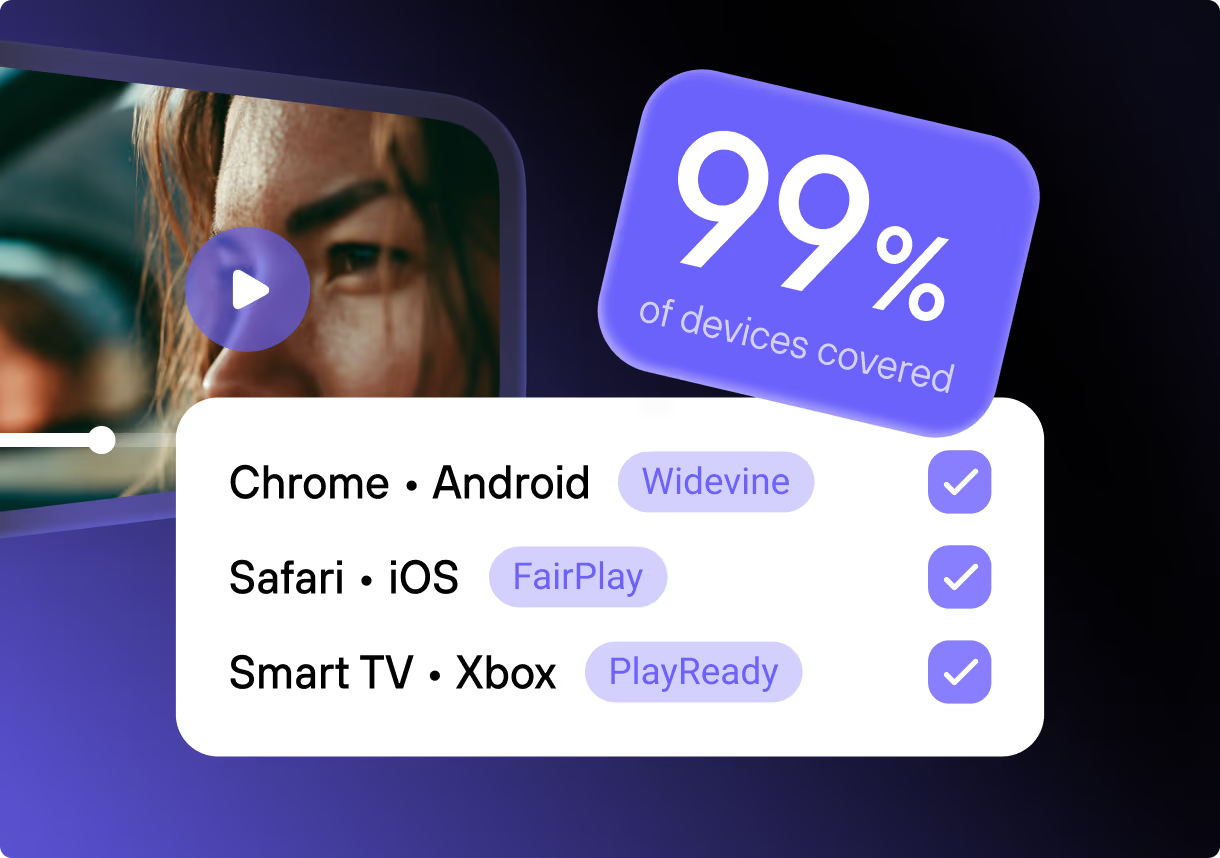
An encrypted file will not decrypt without a licence the platform issues — that is what encrypted video hosting means. We encrypt once in the format both schemes read, then license Widevine and FairPlay together, because neither reaches a full audience alone: by StatCounter’s July 2026 data Safari, where only FairPlay plays, holds about 16% of sessions, and Chrome alone (Widevine territory) 68%.
Widevine reaches Chrome, Firefox, Edge, Android, ChromeOS and the WebOS and Tizen TV platforms (Widevine DRM overview), while FairPlay covers Apple’s platforms (Apple’s FairPlay Streaming overview). One encrypted file can feed both schemes, so multi-DRM licensing comes down to key exchange and device coverage, with the browser exceptions below.
This is the layer people mean when they say secure video streaming stops downloads, and what it blocks is specific enough to test. Downloading through a browser plugin like SaveFrom, or through a separate program such as VLC or ffmpeg, is blocked.
On iOS and Android, and in browsers for macOS and Windows, a screenshot or a screen recording of a playing video comes out empty. How much that is worth on a given device depends on the Widevine security level that device reports, and the level belongs to the handset rather than to the browser.
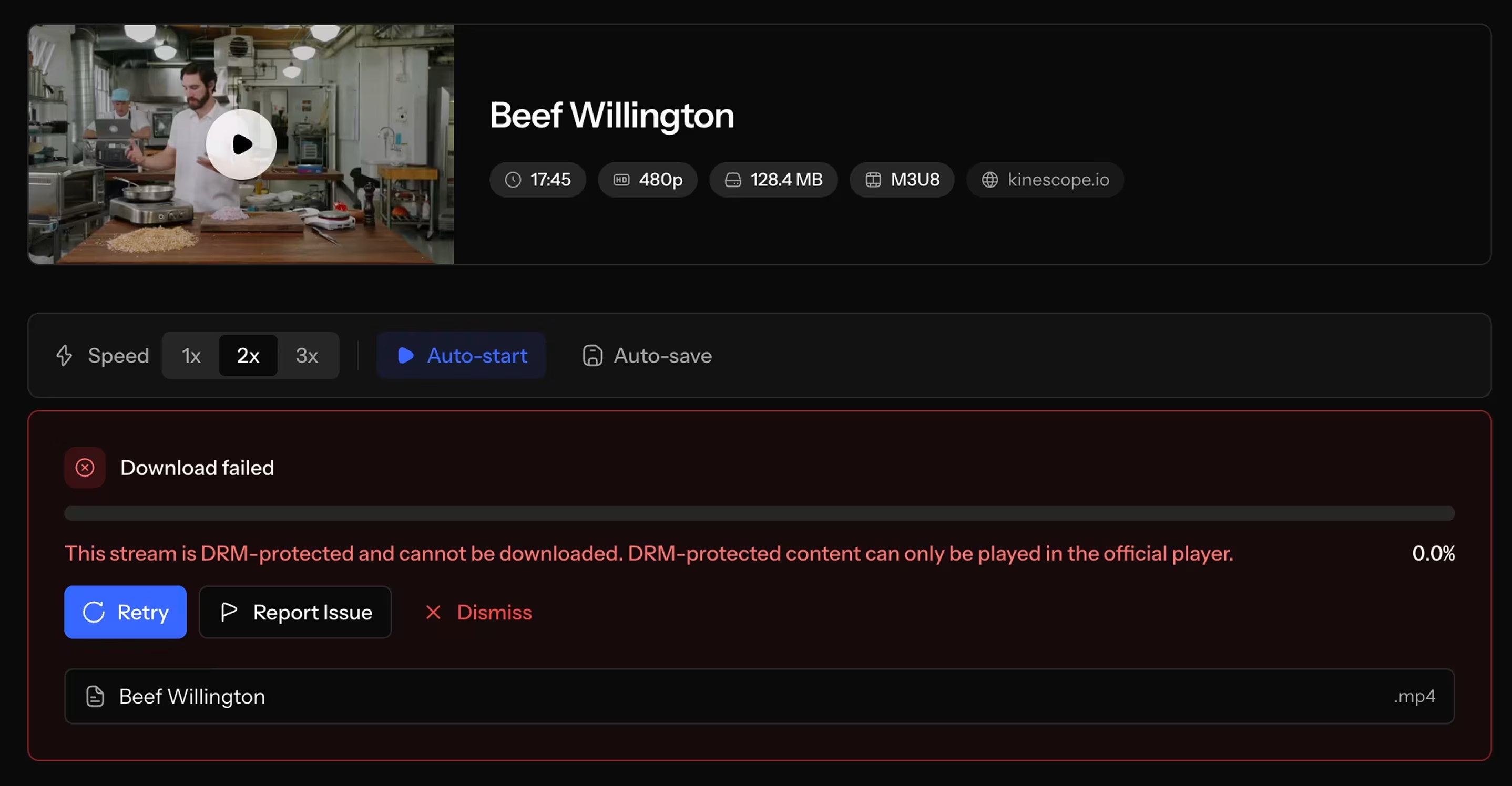
Where screen recording stops
Apple documents where that protection ends. FairPlay content “will automatically not be captured by the iOS 11 screen recording feature or QuickTime Player on macOS”, with the playing area blacked out, though the same note adds that FairPlay “will only provide protection for the video portion of your content” — the sound stays in the recording (Apple Developer QA1970).
Widevine has levels, and only the hardware-backed one keeps keys and decrypted frames away from the host CPU. Neodyme published a full extraction of keys from the weaker level in October 2025 (Neodyme).
Google’s own tooling exists because the level belongs to the individual device, so it has to be queried at runtime: an Android handset can be a fully supported Widevine device and still report the software level (Widevine Help). So the question to ask is which level the viewer’s device reports, because “we use Widevine” answers half of it.
FairPlay also requires a protected connection to the screen: it “always enforces HDCP for each protected content block” (Apple’s FairPlay Streaming overview), HDCP being the copy-protection handshake a display has to complete, so playback fails on a projector whose cable cannot complete it.
The exceptions are specific: Chrome for Android has had Widevine disabled in incognito mode since version 62, and the embedding site needs a valid SSL certificate before DRM works anywhere. Each shows up at the first playback, so check them against the browsers your audience uses. The DRM glossary entry covers the licence exchange behind them.
Dynamic watermarking: how a mark names the account a copy came from
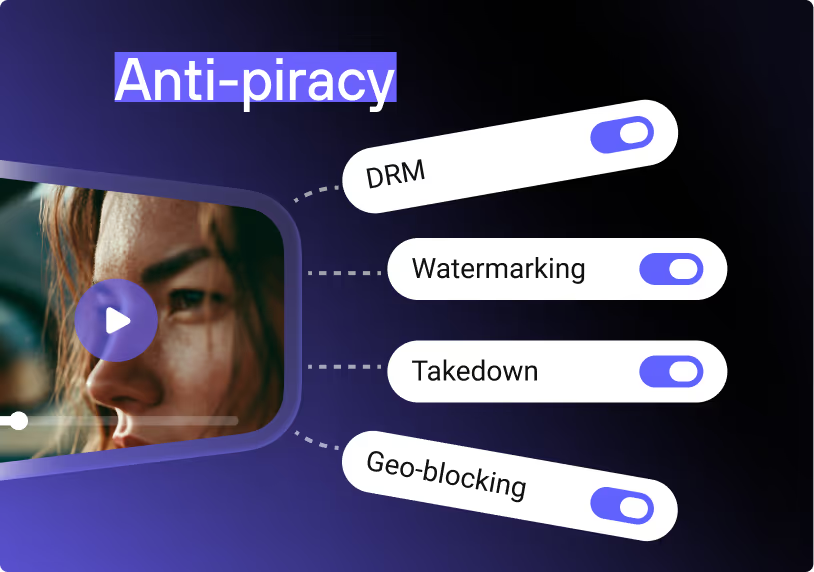
Switch on a dynamic watermark and every stream carries text drawn over the picture, moving position as it plays, usually the viewer’s own data — an email address or an ID your server passes in at embed time. It does two jobs: during playback it deters, because their own name is on the picture, and once a copy is out it is the one control that can still tell you something.
Because the identifier comes from your system, the watermark parameter takes the variable holding that user’s data, their email or their ID, so each stream carries a different mark and a recovered copy points back at one account.
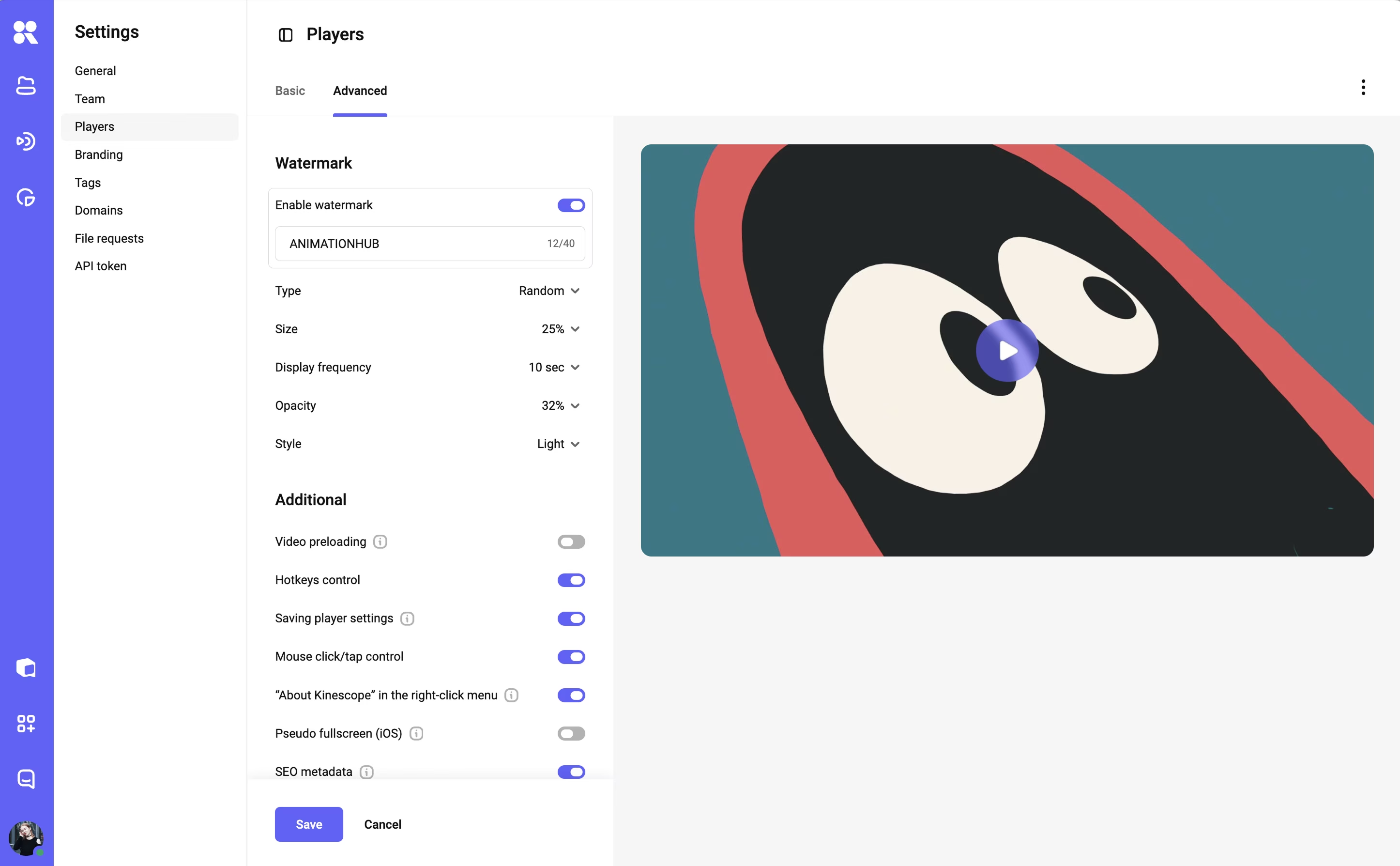
The leak stays possible — which is what forensic watermarking takes further: how such a mark survives re-encoding and cropping, and where the technique breaks down.
Secure video server or hosting platform: when rolling your own is justified
Safe video server and video server hosting are two names for the same fork. Read literally, a secure video server is a machine you control that stores, packages and serves the video: an origin, an encoder in front of it, a CDN behind it, DRM licence keys, and a certificate that has to stay valid. The first thing to price is what standing one up costs.
Gumlet’s June 2026 breakdown puts self-hosted DRM setup between ≈€8,600 and ≈€43,000, plus ≈€430 to ≈€1,720 a month of engineering maintenance, and Apple charges ≈€85 a year for the Developer Program membership carrying the FairPlay deployment package.
That same breakdown, from a company that sells managed video itself, puts the break-even against a managed service between 500,000 and 1,000,000 licence requests a month — a figure worth reading with that interest in mind, though the direction matches Apple’s own published Developer Program cost.
Running secure video streaming yourself is defensible when a DevOps team already handles patching, key rotation, certificate renewal and uptime for other systems, and when a CDN contract is already signed. Where either is missing, that work lands on the team you already have.
A well-run secure video server with its own DRM integration can match a platform layer for layer. Someone still has to be on call when a certificate expires overnight, and someone has to explain to a customer why encrypted playback broke on one browser release. A platform prices that load into the invoice, while in-house it stays a line on someone’s rota.
The checklist: eight questions to ask about secure video streaming
Every layer above except the encrypted connection (included at no extra charge by each vendor checked here) turns into a question a vendor can answer with a fact.
- Which DRM schemes do you license, and which security level does the viewer’s device have to report before protected content plays?
- A viewer passes an embed to a friend. What does the next playback do: call my backend, or keep working until a timer runs out?
- Which plan does each layer belong to — a page password, DRM, dynamic watermarking, domain rules, IP rules, SSO?
- During a screen capture on a phone, is the audio track protected too?
- Is the watermark unique per viewer, and where does its text come from?
- Which browsers and devices lose playback once encryption is on?
- If a copy leaks, can you tell me which account produced it, and what follows from that?
- What does the attestation on your infrastructure cover, and what does it say about a video file being downloadable from my page?
Specifics are the test — a vendor who can only answer with the word secure is selling you a category.
We prepared the whole checklist on one page, save it (direct link to PDF) so it’s there when you’re weighing your options.
How this works in Kinescope
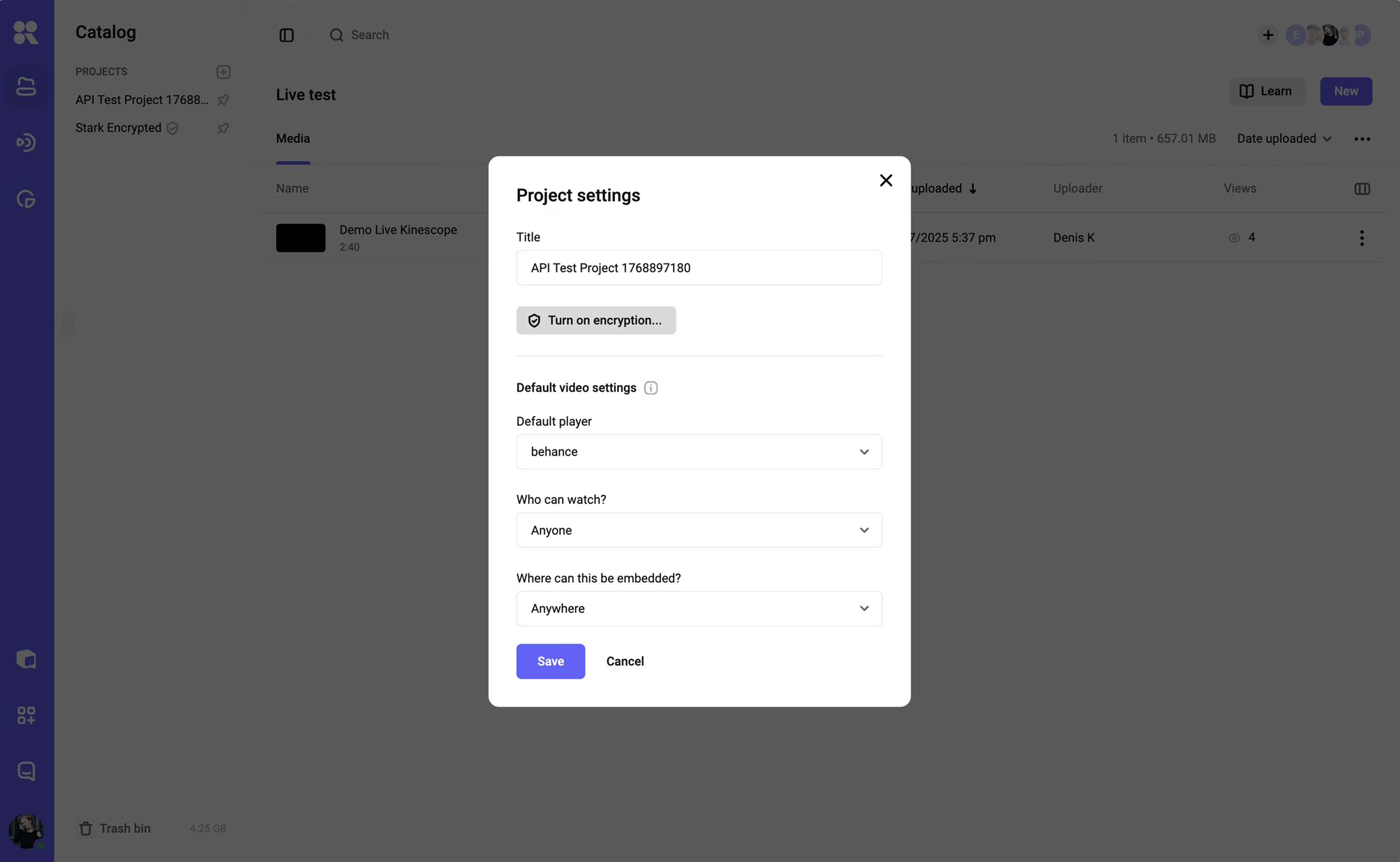
In Kinescope the layers arrive on one plan: encryption with Widevine and FairPlay, the five access levels, domain rules and the dynamic watermark all belong to Super. Kinescope bills by usage: the €10 a month is a minimum that already counts toward traffic and storage, and what a given library costs depends on its volume — a fixed-tier price from another vendor answers a different question. Encryption is off by default: you switch it on in project settings, and switching it back off goes through the support chat.
Access levels and embedding domains are set in each video’s privacy settings, and the dynamic watermark is configured in the player setup, with the viewer identifier passed in by your system.
Ada, a Brazilian EdTech, migrated close to 700 hours of course content onto Kinescope in under two months and has since passed 500,000 learners, moving off Mux in the process. Encryption is per project, so a public marketing library and a paid course can run different rules in the same account.
Each layer here raises the cost of taking your video, and none of them makes it impossible. Where you stop is decided by the threat model you named at the start of this guide.
If what you are protecting is a paid course, an internal recording or pre-release footage, see how the access levels, DRM and watermarking fit together on Kinescope video hosting. For the organised-leak case, anti-piracy protection shows DRM and per-viewer watermarking working together.