Import from cloud drives to Kinescope
Connect Google Drive, Dropbox or Yandex Disk once, then move videos into Kinescope straight from the cloud. Pick files or a whole folder: nothing goes through your computer.
They left Vimeo, Kaltura and Mux
Every number is what they saved against the platform they left.
 16 TBmoved off Kaltura in about two weeksWith Kinescope we get a convenient API, a human touch, stable performance, and fair prices. We worked out the cost up front, and on our volumes it came out about 8× cheaper than Kaltura
 Denis Korovkin, LMS team lead
 −75%off the video hosting bill after Vimeo
 5×lower video costs than on Vimeo
 €10,000+a year saved against Vimeo’s quoteVimeo suddenly told us we had to pay 20× more. With Kinescope we save at least €10,000 a year — and get more stability for free…
 Mathijs de Ruiter, Co-founder
 −60%off the video hosting bill after MuxKinescope’s affordable, scalable, and accessible video solution has been a game-changer, empowering us to deliver world-class education…
 Eriky Kunitake, Head of Business & Operations
 9M+children reached by the films…reinvest our resources into other matters, like the direct work with children in our shelter…
 Ysrael C. Diloy, Child Protection Specialist
Move videos from a cloud drive

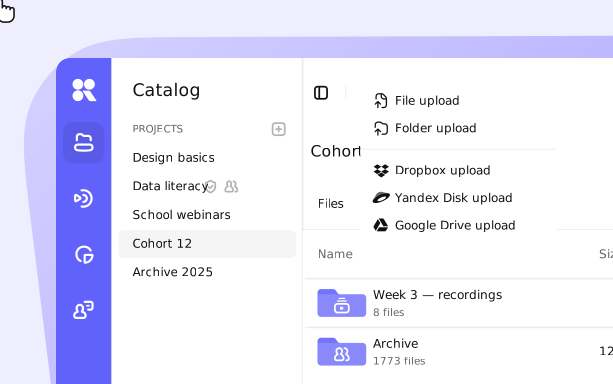
1. In the catalog, click New → Add cloud drive.
2. Pick Google Drive, Yandex Disk or Dropbox and sign in to it.
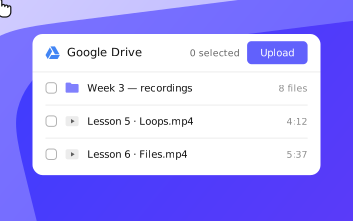
1. Click New again and choose the upload item with your drive’s name, for example Google Drive upload.
2. Select one or several files, or a whole folder with its contents.
3. Click Upload: the files go to Kinescope straight from the cloud storage.
What the upload gives you
Three cloud drives
Google Drive, Dropbox and Yandex Disk. The set of services may differ depending on your region.
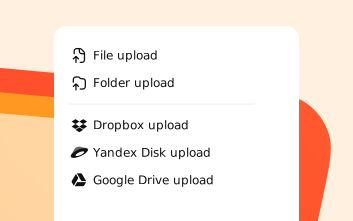
Files or whole folders
Select one file, several files or a whole folder with its contents in one upload.
Private once they land
Uploaded videos are private by default, with domain rules, watermarks and DRM on paid plans. More on private video hosting.

Move your cloud videos for free
Create a Kinescope account, connect a drive and pick what to upload. No credit card required.
FAQ
Can’t find the answer you need? Check out our Video guide.
Stop downloading videos just to upload them again.
Free to start, then from €10/month. No credit card required.